

Gmail and iCloud Mail in one calm inbox, grouped by day. Triage with a keystroke or a swipe: archive, snooze, follow up or file.
Coming soon · Beta opening shortly
Everythingin its place.
Your email, calendar and tasks on one calm screen, with a plan for your day built in. erran brings your inbox, your meetings and your to-dos together, so nothing slips through the gaps.

Three apps. One place.
Stop switching between tabs and apps. erran puts the three things your day runs on side by side, and helps you plan around them.
Calendar
All your Google and iCloud calendars together. Today's schedule sits beside your mail, and free times drop straight into an email.
Tasks
Quick to-dos and full project boards, all in one All Tasks view. Turn any email into a task with one key, then give it a time.
NewMeet erran
Calm, clear and timeless.
Warm paper, ink text, quiet colour and an editorial voice for headings. Emails and tasks sit on soft cards grouped by day, and unread mail stands out with a stripe and a second line of preview.
Try it: choose the colour of the cards.
- Light or dark, your choice, whatever the rest of your Mac is doing, with your own card colour and heading style.
- Swipe your way. Swipe left to archive and right to trash, or choose what each swipe does.
- Calmer and clearer. Fewer buttons, one alert at a time, and the same names for the same things everywhere.
Inbox2 unread
TODAY
SC
Sam Carter09:42
Venue walkthrough on Thursday?
Could we do 2pm instead? I've asked the venue to hold the main hall until we've had a look round.
PR
Priya Rao08:15
Updated budget, v3 attached
Here's the latest with the staging and sound changes.
YESTERDAY
Archive
TL
Train LineYesterday
Your e-ticket for Saturday
Your booking reference is K7Q2 PLM.
JL
Jo LewisYesterday
Volunteer rota for Saturday
I've filled most of the slots. Could you take a look at the afternoon shifts?
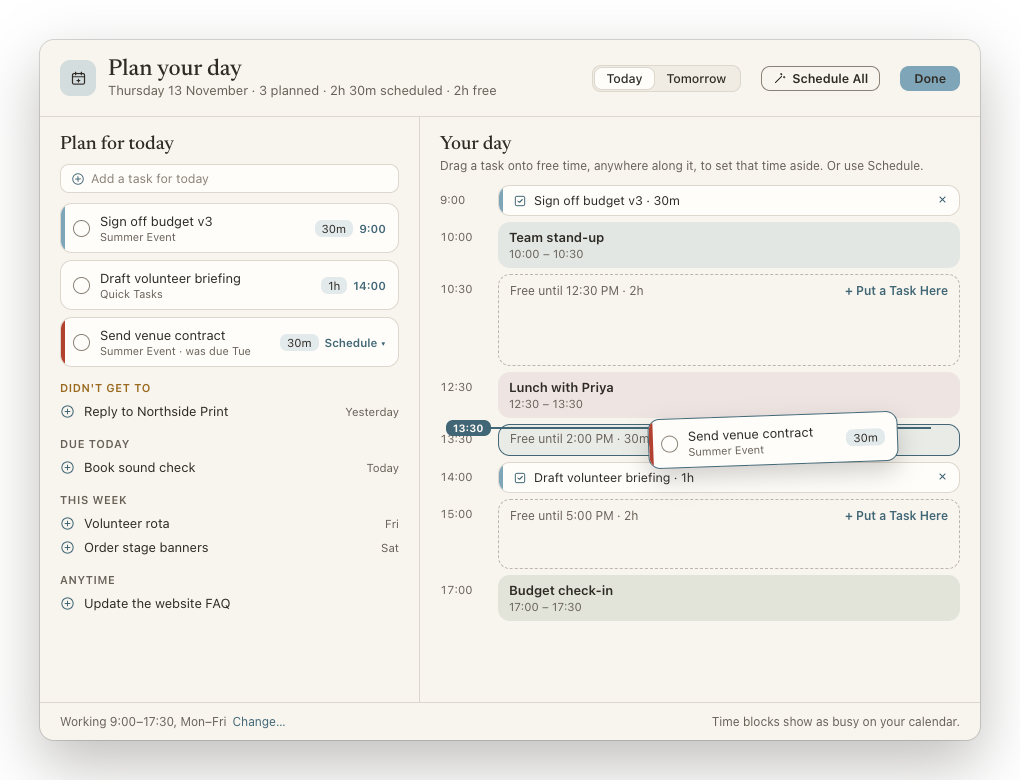
Plan your day
Give every task a time.
Choose what you'll work on today, then drag each task into free time on your calendar. erran sets that time aside, so it shows as busy to everyone else.
- Schedule All fits your tasks into the gaps for you, inside your working hours.
- Nothing gets lost. Anything you didn't get to comes back at the top of tomorrow's plan.
- Wrap up your day. Near home time, the Today panel shows what's still open and offers to plan tomorrow.
- Review the week. On Fridays: what you finished, what's slipping, and what's coming next week.
Tasks
Tasks that mean business.
Most email apps give you a checkbox. erran gives you a project tool.
- All Tasks: every list and board together, as a table, kanban, timeline or calendar.
- See what's urgent. Overdue tasks get a red stripe and today's a blue one, grouped Overdue, Today, Tomorrow and This Week.
- Boards with real structure: status, owner, priority, dates, subtasks and comments.
- Share a board by email, and everyone sees changes within about a minute.
- Email to task in one key, linked back to the email, and synced with Google Tasks on your phone.
All Tasks
TableKanbanTimelineCalendar
Not started 3
Send venue contract
Order stage banners
Update the FAQ
Working on it 2
Sign off budget v3
Volunteer rota
Done 2
Stage plan
Book train
Meetings
Walk into every meeting ready.
Meetings coming up get a Prep button. One click gives you a single page with everything you need. And when it's over, erran helps you follow up.
✦ Prep
Join
Summer Event planning
Today, 14:00 – 15:00 · Studio 2
With Sam, Priya and Jo. 5 recent emails, most recently Updated budget, v3. 2 open tasks.
What you've been discussing
Moving the walkthrough to Thursday, and the budget changes for staging and sound.
Who's coming
SC
Sam CarterEmailed today
PR
Priya RaoEmailed yesterday
JL
Jo LewisHasn't replied
Documents
XLSBudget v3.xlsxFrom Priya's email
DOCNotes from last week's planningLast meeting
- Who's comingWho has replied, and when you last emailed each of them.
- What you've been discussingA short summary of your recent emails with the guests.
- The papersFiles on the invite and recent meetings, linked documents and email attachments.
- Open tasks and notesIncluding notes from the last time the meeting happened.
- Agenda linksPulled straight out of the invitation.
Meeting follow-up
Turn the notes into next steps.
Open a meeting's notes and erran pulls out the actions everyone agreed, ready to add as tasks, and writes a follow-up email to everyone who was there. You check it, then send.
Follow UpFrom “Summer Event planning: notes”
Actions agreed
Priya to book the sound crewFri
Ellie to confirm the stage size with the venueMon
Add 2 as Tasks
Follow-up email
Hi all, thanks for today. Quick recap: we're going with the larger stage, Priya is booking the sound crew by Friday, and I'll confirm the stage size with the venue on Monday…
Write Email to EveryoneWritten on this device from the notes. Check it before sending.
On-device AI
Help that stays on your Mac.
erran drafts, sums up and answers using Apple Intelligence, right on your device. Your mail isn't sent anywhere to do it.
Draft replies
Type a few words and get a full reply, ready to edit.
yes to 2pm, ask about parking
Ask erran
Ask a question in the search box. The answer comes from your mail, Slack, tasks and calendar.
When is the sound check?
Saturday at 9:00 at the Corn Exchange. Alex confirmed it in Monday's email, and it's on your calendar.Answered on this device from the results below.
Suggest times
While you write, drop in three free times from your calendar, and theirs where it's shared.
Would any of these times work for you?
- Thursday 13 November, 2:00–2:30 PM
- Friday 14 November, 10:30–11:00 AM
- Monday 17 November, 3:00–3:30 PM
Long threads are summed up too, with tasks and meetings spotted for you, one click away.
Your Day
Start every morning clear.
Your Day greets you with today's meetings, the tasks you planned, anything overdue and the emails waiting on you, with a short summary it can read aloud. Plan your day straight from it.

Your Day, your way
On plain paper, or behind Bing's or Wikimedia's picture of the day, or your own photos.
Wrap up and review
See what's still open at the end of the day, and look back over the week on Fridays.
Private by design. Your mail goes straight to Google or Apple, and the AI runs on your device.
And plenty more.
Pop-out windows
Calendar and Tasks in their own windows, like separate apps. Drag between them.
Slack alongside
Your channels and messages next to your mail. Turn any message into a task.
Find finished tasks
A Completed list in the sidebar, and Show Completed at the end of every list.
Snooze and follow up
Hide an email until later, and get nudged when someone hasn't replied.
Knows your people
Suggested recipients learn who you write to from each account's sent mail.
Quick Notes
A scratch pad beside your mail that saves as you type.
Be first in line.
The erran beta is opening soon. Leave your email and we'll tell you the moment you can try it, with the occasional update as we get closer to launch.
No spam. Unsubscribe any time.